What Is an MCP Server? How MCP Works, Where It Runs and How to Secure It
A guide to the Model Context Protocol: hosts, clients and servers, the stdio and Streamable HTTP transports, OAuth 2.1 with RFC 9728, and MCP security risks with a checklist. Then the EchelonGraph MCP server: free, keyless, read-only CVE and exposure tools with verifiable SLSA provenance.
Akshay Dubey
Founder
The Model Context Protocol (MCP) is a standard way for AI assistants such as Claude and Cursor to reach tools and data outside the model: your files, your tickets, a database, or a live vulnerability feed. This guide explains what an MCP server is, how the protocol works, where servers run, and what can go wrong when they face the internet. It then shows what the EchelonGraph MCP server does, how to install it, and how to check what we say about it yourself.
In short:
echelongraph-mcp on npm) gives any MCP client that can run a local (stdio) server our fused CVE intelligence, plus an internet-exposure footprint for the CVEs our KEV-exposure radar tracks. It is free, keyless and read-only, answers both protocol eras, labels every result so a model cannot mistake an outage for an all-clear, and every release since 2.3.3 carries verifiable SLSA provenance.What is the Model Context Protocol?
Large language models know only what was in their training data. Ask one whether a CVE published this morning is being exploited and it will guess, or answer confidently from a snapshot that is months old. MCP fixes that plumbing problem. It is an open protocol, released by Anthropic in November 2024, that standardises how an AI application discovers and calls external capabilities, so one integration works in every compatible client instead of being rebuilt for each.
Think of it as a common socket. Before MCP, every AI product needed custom glue for every data source. With MCP, a data source ships one server, and any host that speaks the protocol can use it: Claude Desktop, Cursor, Cline, Windsurf and others.
How MCP works: hosts, clients and servers
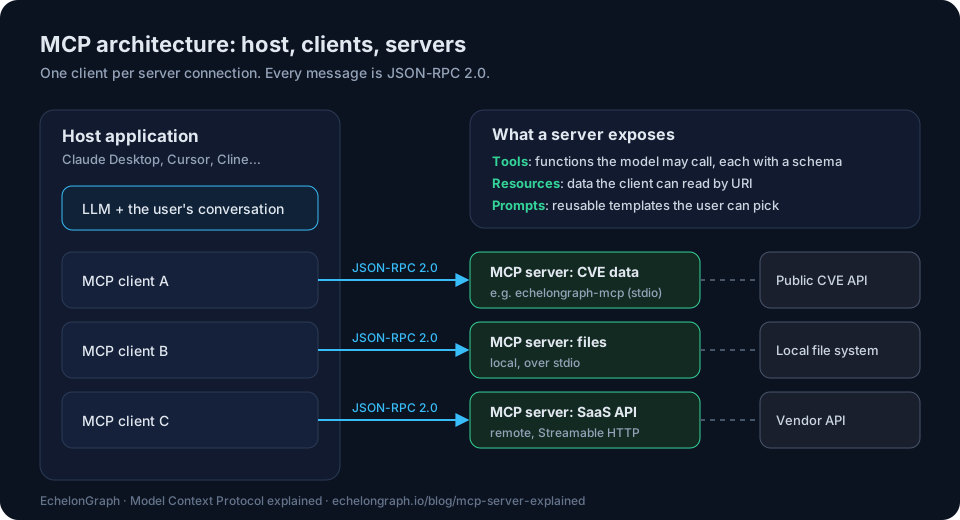
There are three roles:
Every message is JSON-RPC 2.0: a request with a method name and parameters, and a response or an error. Up to revision 2025-11-25, a connection starts with an initialize handshake in which the two sides agree a protocol version and state their capabilities. The 2026-07-28 revision removes that handshake: every request carries its protocol version and capabilities in _meta, and servers must also answer server/discover, which a client may call first to learn what the server supports. Either way, the client can then list the server's tools and call them.
A server exposes three kinds of things:
get_cve with an argument cve_id is a tool.The model never talks to your systems directly. It asks the host to call a tool, the host (usually after your approval) sends tools/call to the server, and the server's answer goes back into the conversation. That is also why the quality of a server's answers matters so much: the model treats them as ground truth.
Where MCP servers run: stdio and Streamable HTTP
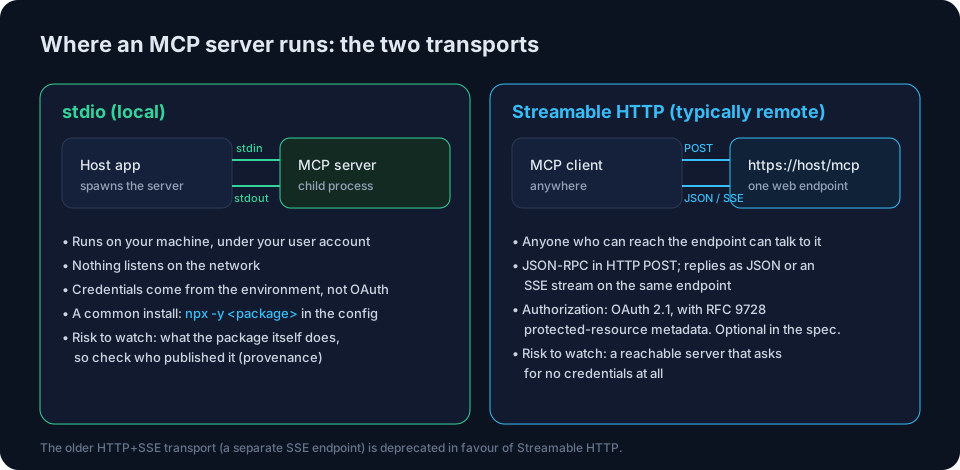
MCP defines two standard transports:
npx -y <package> or uvx <package>.https://host/mcp. The client sends JSON-RPC in HTTP POST requests, and the server answers with JSON or streams its reply as server-sent events (SSE) on the same endpoint. Anyone who can reach the endpoint can talk to it (the spec says a server running locally should bind only to localhost). The older HTTP+SSE transport, which used a separate SSE endpoint, is deprecated in favour of Streamable HTTP.The choice decides where the risk lives. For a local server, what matters is what the package does on your machine, which makes its supply chain (who built and published it) the question. For a reachable server, what matters is who can reach it and what they can do without credentials.
MCP authorization: OAuth 2.1 and RFC 9728
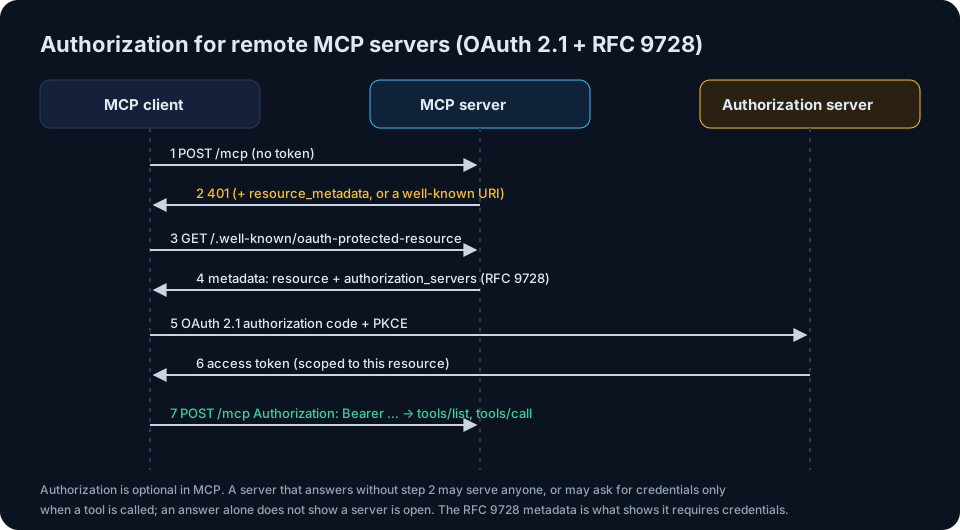
For servers reached over HTTP, the MCP specification builds authorization on OAuth 2.1. The server acts as an OAuth resource server:
WWW-Authenticate header's resource_metadata parameter or at a well-known URI.Authorization: Bearer ….Two details make this more than a formality. First, authorization is optional in MCP. A server that answers without asking for credentials may serve anyone who can reach it, but it may also enforce credentials only when a tool is called, so an answer to the first request alone does not show a server is open. Second, a 401 on its own proves little. It is the published metadata, naming this exact endpoint and an authorization server, that shows the server was built to require credentials.
MCP security risks, and how to reduce them
MCP gives a model hands. The risks follow from that, and most have well-understood mitigations:
A short checklist before you add any MCP server:
The last question is easy to overlook, and for security data it matters most: a model reads an empty result as "nothing found".
The EchelonGraph MCP server
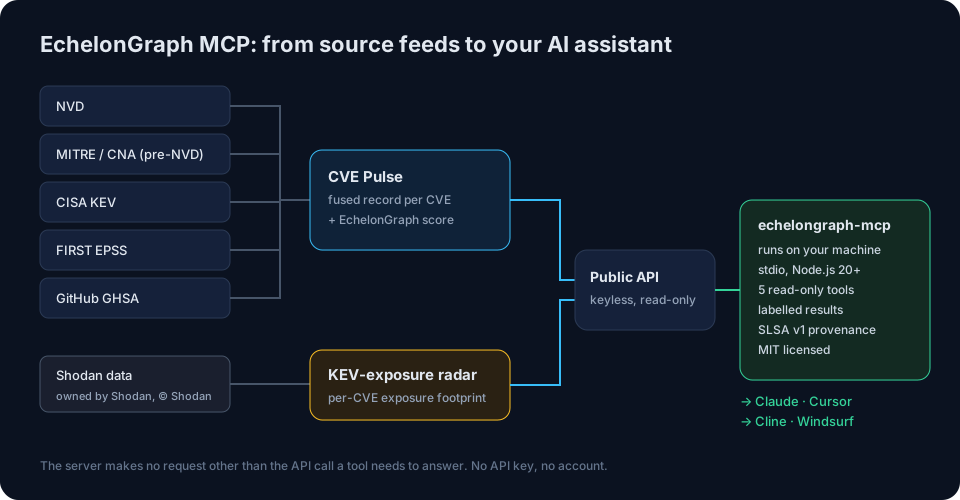
echelongraph-mcp is our MCP server for vulnerability and internet-exposure intelligence. It connects any MCP client that can run a local (stdio) server to EchelonGraph's CVE Pulse, which fuses NVD, MITRE CNA records (including records NVD has not yet enriched), the CISA Known Exploited Vulnerabilities catalogue, FIRST EPSS and GitHub security advisories into one record per CVE, with the EchelonGraph score. It adds an internet-exposure footprint for the CVEs our KEV-exposure radar tracks (CISA KEV and high-EPSS CVEs in tracked products): how many internet-facing services (distinct ip:port) the radar has on record running a version that maps to the CVE. That count is inferred from banner versions in a sample of Shodan results, not an internet-wide census, and the data is derived from Shodan data (owned by Shodan, © Shodan).
It is free and keyless: no API key, no account, no auth, and it is read-only. It runs on your machine over stdio and makes no request other than the API call a tool needs to answer. The code is MIT-licensed, and the source is public at github.com/echelongraph/echelongraph-mcp.
The five tools
| Tool | What it answers |
|---|---|
cve_summary | Counts of active CVEs by severity band; the CVEs with no severity band from any source (not yet scored, never a rating of "None"); the same CVEs counted by NVD's severity label, as provenance; the rejected (withdrawn) records outside the total; and when the feed was last updated. |
search_cves | Search and filter CVEs by severity, minimum CVSS, text and sort order (including by EPSS), with EchelonGraph scores, and says which rows are not yet scored. |
get_cve | The full record for one CVE: CVSS v3 and, when scored, v4; the EchelonGraph score and its confidence; EPSS; CISA KEV status and known ransomware use; the GitHub advisory id; references; and when it was published, modified and last updated. |
cve_exposure | The internet-exposure footprint for one CVE the KEV-exposure radar tracks: the count of exposed services (distinct ip:port), with a country and product breakdown, derived from Shodan data (owned by Shodan, © Shodan). |
exposure_radar | Aggregate totals across EchelonGraph's exposure radars (several derived from Shodan data, owned by Shodan, © Shodan): services running CISA KEV CVEs, unauthenticated data stores, leaked credentials, shadow AI, and MCP servers found in our own Certificate Transparency feed, each number labelled by what it counts. |
Ask it things like:
Install in Claude Desktop, Cursor, Cline or Windsurf
You need Node.js 20 or later; npx fetches the package on first run. Add this entry to the client's MCP configuration (claude_desktop_config.json for Claude Desktop, ~/.cursor/mcp.json for Cursor, or the client's MCP settings), then restart the client:
{
  "mcpServers": {
    "echelongraph": {
      "command": "npx",
      "args": ["-y", "echelongraph-mcp"]
    }
  }
}
Two optional environment variables: ECHELONGRAPH_API_BASE (default https://app.echelongraph.io) points it at another API base, and ECHELONGRAPH_API_TIMEOUT_MS (default 15000) sets the per-request timeout. A slower answer is reported as a failed lookup, not as empty data.
Every result says what it is
A security answer that turns an outage into "no findings" is worse than no answer. So every result from echelongraph-mcp comes in one of two shapes:
exposure_radar relays only the fields it can label and names what it left out), then a one-line note saying the call succeeded, which base URL answered and what it found. When the CVE feed genuinely holds nothing for a query, the note says so in words, because a measured zero is a measurement.isError: true) whenever the lookup did not complete. The host was unreachable, answered non-2xx, timed out, or answered with something that is not a JSON object. The text names the tool, the cause, the path and the base URL, and a failure is never rendered as a success with empty fields.Every result also carries structured content with a state of measured, not_assessed, failed or invalid_input, plus when the underlying observation was made (measured_at), how the numbers were produced (method), what the answer covers (coverage), and how fresh the producing radar is (freshness). Every tool declares its output schema and the annotations readOnlyHint: true and destructiveHint: false. Exposure answers never claim to be dated measurements they are not: a count is relayed with a label saying exactly what it counts and why it is not presented as measured.
Counts that are easy to misread are labelled in the answer itself. For example, cve_summary tells the model that CVEs with no severity band are not yet scored, not rated "None". It also says the NVD-label histogram (NVD's label, with a pre-NVD label standing in until NVD's record arrives) is provenance, not EchelonGraph's rating, and that rejected records are withdrawn records, never vulnerabilities.
Both protocol eras
The server answers both eras of MCP over stdio:
server/discover gets a DiscoverResult, and sends each request with the per-request _meta envelope.initialize negotiates 2025-11-25, 2025-06-18, 2025-03-26 or 2024-11-05.Its behavioural test suite runs once as a 2026-07-28 client and once as a 2025 initialize client, with no network.
Verify it yourself: provenance you can check
Since version 2.3.3, every release is published by GitHub Actions from a tag in the public repository, through npm trusted publishing, with SLSA v1 provenance. After every publish, the release workflow checks that the attestation npm serves names the release workflow, the tag and the commit it was built from, and that npm audit signatures verifies it; the run fails if either check does. You do not have to take our word for it:
npm view echelongraph-mcp dist.attestationsnpm audit signaturesThe first shows that npm holds SLSA v1 provenance for the latest version, and where to read it; the package's page on npmjs.com shows the source commit, build file and workflow run it names. The second, run with npm 9.5 or later in a project that has installed the package, verifies the registry signatures and provenance attestations of what you installed.
Why EchelonGraph MCP
Here is what to look for in a security MCP server, what echelongraph-mcp does for each point, and how to check it yourself:
| What to look for in a security MCP server | echelongraph-mcp | How to check |
|---|---|---|
| More than one source per CVE | NVD, MITRE CNA records (including pre-NVD), CISA KEV, FIRST EPSS and GitHub GHSA, fused into one record with the EchelonGraph score | get_cve on a CVE in CISA KEV, e.g. CVE-2024-3400 |
| Whether a CVE is exposed on the internet, not just whether it exists | For the CVEs the KEV-exposure radar tracks (CISA KEV and high-EPSS), a count of exposed services (distinct ip:port) from a sample of Shodan results, not an internet-wide census; derived from Shodan data (owned by Shodan, © Shodan) | cve_exposure |
| An outage never reads as an all-clear | Failures are MCP errors naming the cause; a measured empty result says it looked and found nothing | Point ECHELONGRAPH_API_BASE at an unreachable host and call any tool |
| Numbers that say what they count | state, measured_at, method, coverage and freshness on every result, with a declared output schema | tools/list, then any tool call |
| Supply chain you can verify | SLSA v1 provenance on every release since 2.3.3, built from a public tag | npm view echelongraph-mcp dist.attestations |
| Current protocol support | Both 2026-07-28 (server/discover) and the 2025 initialize era | Run npm test in the public repository |
| Cost and friction | Free, keyless, read-only; one entry in the client's config | The config block above |
And something a CVE lookup alone cannot give you: we also measure MCP servers on the internet.
We also measure MCP servers on the internet
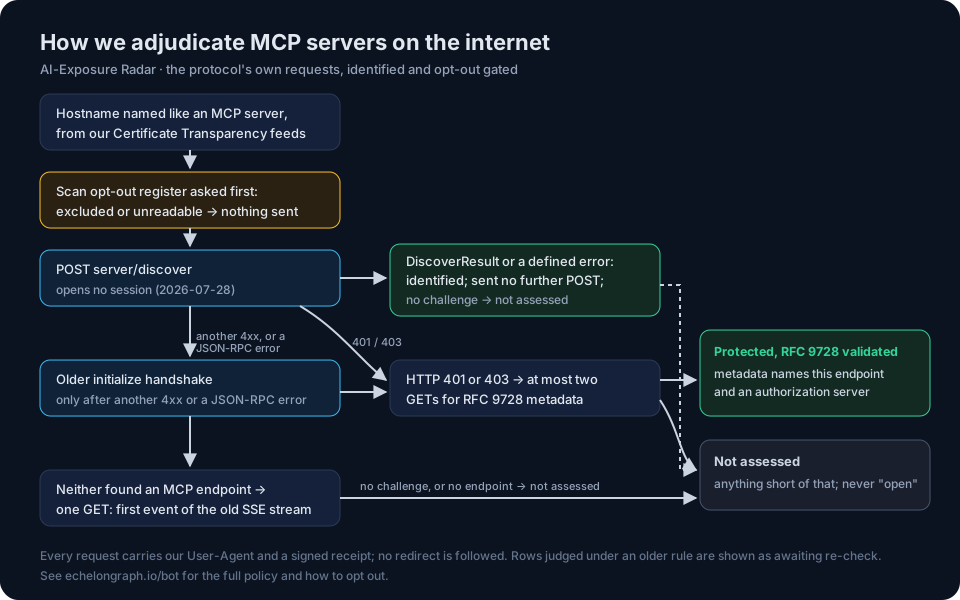
EchelonGraph's AI-Exposure Radar looks for hostnames named like MCP servers (a label such as mcp or mcp-server) in our own Certificate Transparency feeds, which record newly issued, publicly trusted TLS certificates. It then checks, with the protocol's own requests, whether each server requires authorization. MCP servers are identified by server/discover, the older initialize handshake only when that is refused, and, on a host named like an MCP server where neither finds an MCP endpoint, the first event of the deprecated SSE transport's stream. Under the 2026-07-28 revision server/discover opens no session, and a server that answers it with a DiscoverResult, or with an error that revision defines, is sent no further POST, so it is not written to. One counts as requiring authorization only when it refuses either request with HTTP 401 or 403 and publishes matching OAuth protected-resource metadata (RFC 9728); anything short of that is reported as not assessed, never as open.
Before any request is sent, the scan opt-out register is asked about the host, and nothing is sent if the host has opted out of Radar scanning or the register cannot be read. Every request carries our User-Agent and a signed receipt the host's owner can verify. The adjudicated counts are published on the Shadow AI radar, with their method, and exposure_radar relays the same counts to any MCP client. Our bot page documents exactly what we send and how to opt out.
Everything else EchelonGraph does
The MCP server is one door into a larger platform. The features page lists every capability; here is the map:
Get started
The protocol will keep changing; 2026-07-28 is the latest revision the server supports. We update the server as MCP evolves, and every release since 2.3.3 is published from a public tag with provenance you can check.
Protect your infrastructure before the breach
Map your attack surface, automate compliance, and detect insider threats in real time.
Book a demo →